Calculation of a ferrite core multilayer coil in MAXWELL 3D
 This article continues a series on calculating inductance in electromagnetic simulators and is devoted to calculating the inductance of a multilayer coil with a ferrite core using ANSYS MAXWELL 3D, a program included in the ANSYS ELECTRONICS DESKTOP suite. Unlike ANSYS HFSS, which uses a so-called “full solver” for calculations, this program uses a simplified model of either a static or quasi-static magnetic field, assuming that the current density at any point in the cross-section of any coil is the same. This assumption is known to be valid only at very low frequencies. As an example, we will calculate a multilayer coil on a ferrite drum core. What is the difficulty in calculating such inductive elements using the analytical formula-based method? The problem is that we have a complex-shaped core with a not closed magnetic circuit. In this case, the magnetic field is not all concentrated inside the core, and a simplified calculation using the AL coefficient is impossible. After all, the magnetic field configuration depends not only on the core properties and the number of turns, but also on the winding dimensions. MAXWELL 3D software allows you to calculate the magnetic field configuration of such a coil and, accordingly, its inductance.
Let's take a “drum” DR2W 10ˣ12, which, according to the datasheet, has the following specifications:
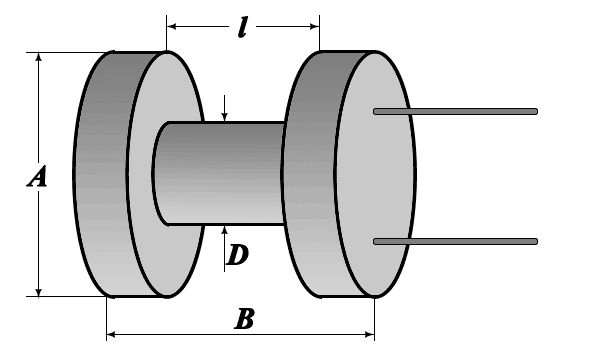 |
A = 10 mm B = 12 mm D = 5 mm l = 7 mm |
This core also serves as the former on which the winding is located. For clarity, let's first calculate a multilayer coil wound on a former of the same dimensions, but with an “air core” (without ferrite) in Coil64. Then, we'll perform the same calculation in MAXWELL 3D and compare the results. Finally, in the second step, we'll add the core to the model.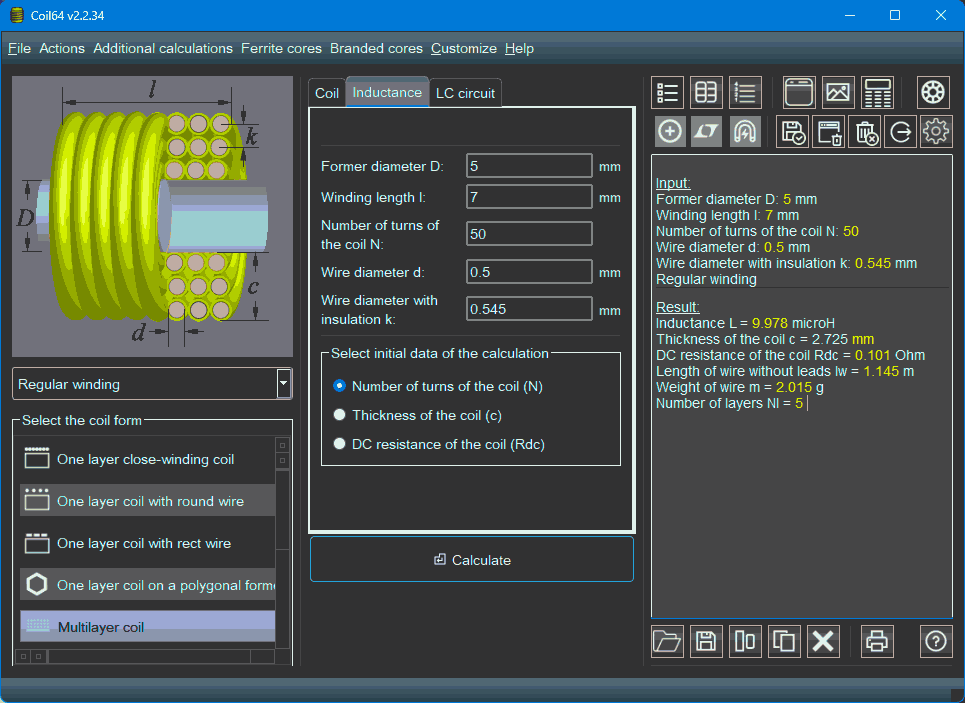 The Coil64 program calculates a multilayer coil using the so-called summation method. It calculates the self-inductance of each particular turn and the mutual inductance of all possible pairs of turns. The sum of these values is the self-inductance of the multilayer coil. The “solid turn method” is also used to calculate a multilayer coil. This is because the magnetic field configuration of a multilayer coil is identical to the magnetic field configuration of a single turn of a solid bus-bar with the same cross-section, provided that the current density at any point in the cross-section of this turn is the same. In other words, the entire winding, consisting of multiple wires, is simply substituted by solid metal. In this case, it is sufficient to calculate the inductance of such a massive virtual turn, multiply it by the square of the number of real turns, and we obtain the inductance of our multilayer coil. In MAXWELL 3D, a multilayer coil is typically modeled as a “solid turn”.
Open ANSYS ELECTRONICS DESKTOP. A new project, “Project1” will automatically open. Within it, we'll create a new design, “Maxwell3DDesign1”. By default, “Solution Type → Magnetostatic” is selected. This solver is used for DC calculations for all kinds of relays, traction mechanisms, and other DC devices. Chokes and other inductive elements operating with AC are calculated using the “Maxwell 3D → Solution Type → Eddy Current” solver, which is what you should switch to. A good practice when modeling is to first define the design variables. We'll use the former diameter, winding length and thickness, and the number of turns as these variables. These parameters are sufficient for creating a 3D model of a multilayer coil.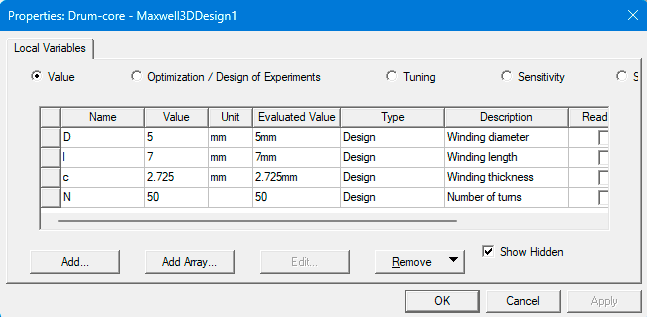
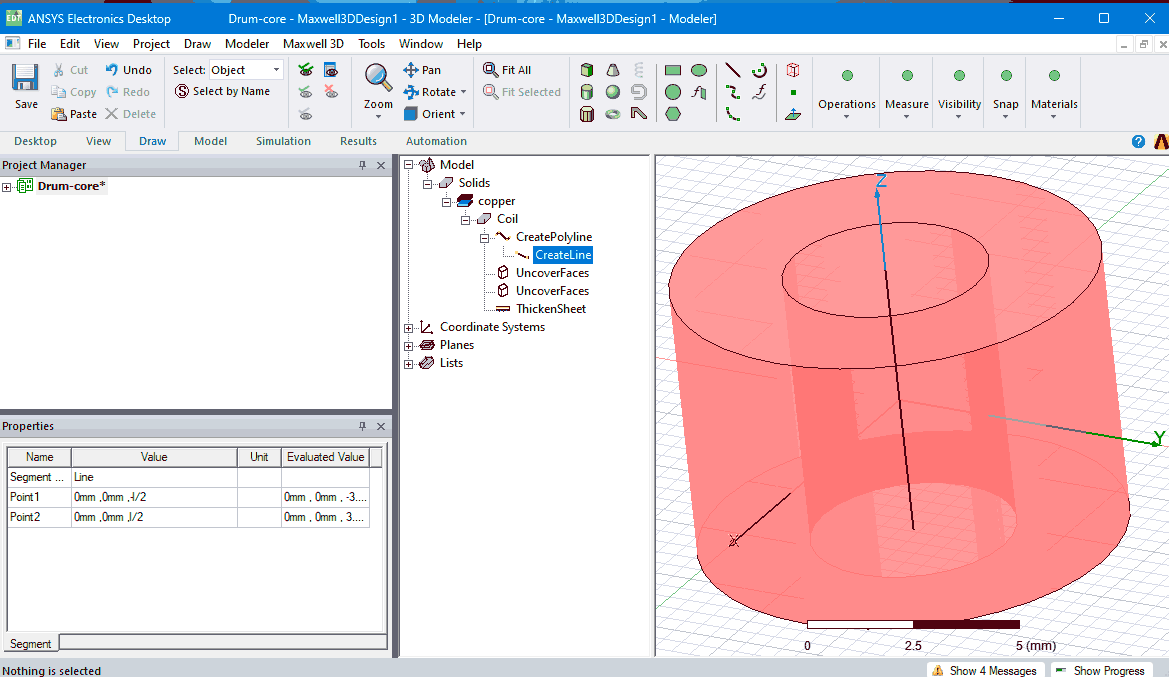
Let's create a 3D model of our coil as a single solid turn. This can be done in several ways, for example, using the “Draw → Cylinder” tool, or using the “Draw → Line” tool, substituting our variables or variable-based expressions for the dimensions. This allows us to use this design as a template, allowing us to calculate coils with any other dimensions simply by changing the variable values. Rename this object “Coil” and assign it the copper material. Then, using the “Modeler → Surface → Section” tool, create a cross-section of our coil in the ZY plane. Halve the “Sheets → Coil_Section1” plane that appears in the model tree using “Modeler → Boolean → Split”. Assign a source to this plane: “Maxwell 3D → Excitations → Assign → Current”. In the “Current1” source properties, select any current value other than zero, and the type, since the coil has more than one turn, is “Stranded”. Using the “Maxwell 3D → Excitations → Set Eddy Effects” menu, select the object where the eddy currents flow. Our model doesn't have such an object, so we can uncheck the “Coil” object. Next, we need to limit the volume in which the magnetic field is calculated. To do this, create a boundary region: “Draw → Region” with a volume margin of “Percentage Offset = 100”.
 |
 |
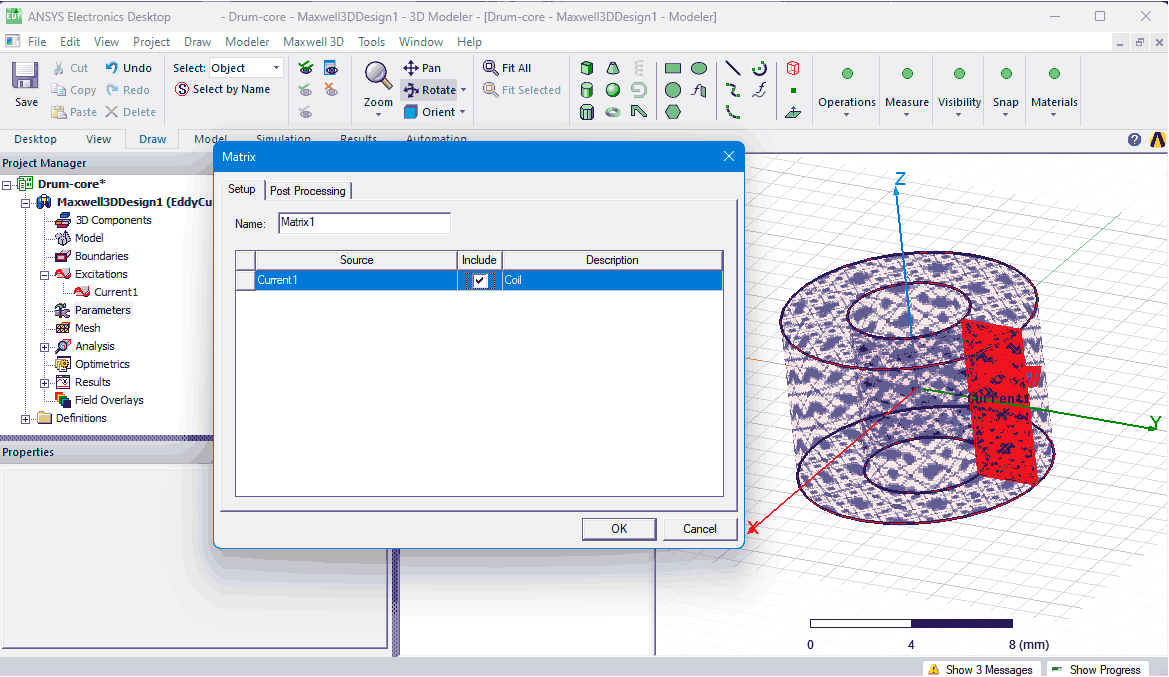 |
| Creating a 3D model of a coil | Setting the calculation boundaries and excitation source | Setup calculation parameters |
We need to set the solution. In the project tree, right-click “Parameter → Assign → Matrix”, check “Include: Coil”, and in the “Post processing” tab, in the “Turns” cell, substitute our variable N for 1. Add “Analysis → Add solution setup”. In the parameters window that opens, you can specify the adaptive frequency in the “Solver” tab, and leave the rest at default. Now you can save the project and run the calculation. The calculation takes only a short time. You can view the results by creating a table using the “Maxwell 3D → Results → Create EddyCurrent Report → Data Table” menu item. In the window that opens, select inductance (Category: L) and click the “New Report” button. The image shows the results for the Magnetostatic and Eddy Current solvers for comparison: As we can see, the inductance values obtained using Coil64 and MAXWELL 3D with the EddyCurrent solver are quite close.
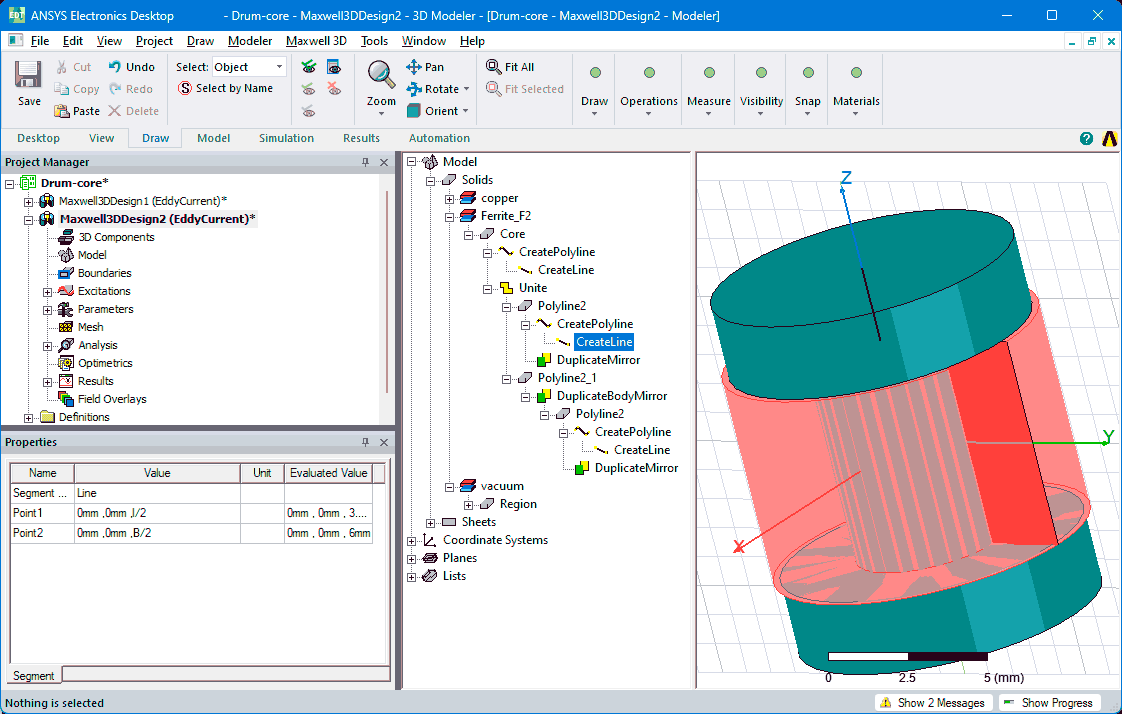
Now we can add the core to the model. Copy and paste the design into the same project as “Maxwell3DDesign2”. Add new variables related to the core dimensions to this design.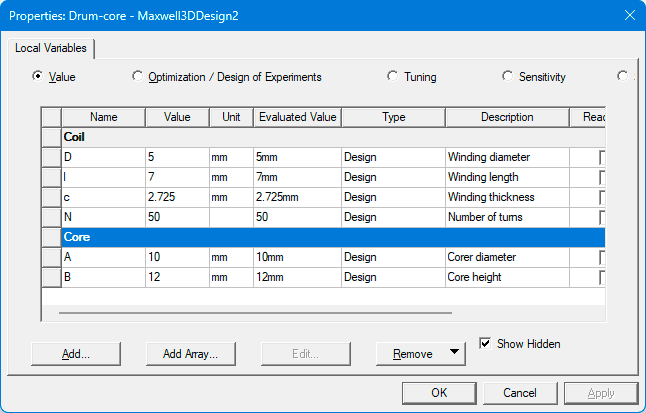 Create a 3D model of the core and assign a material to it. Select the ferrite material from the library and duplicate it using the Clone material(s) button. You can name the clone (in our example, Ferrite_F2) and change its parameters (in our example, magnetic permeability µ=650).
 |
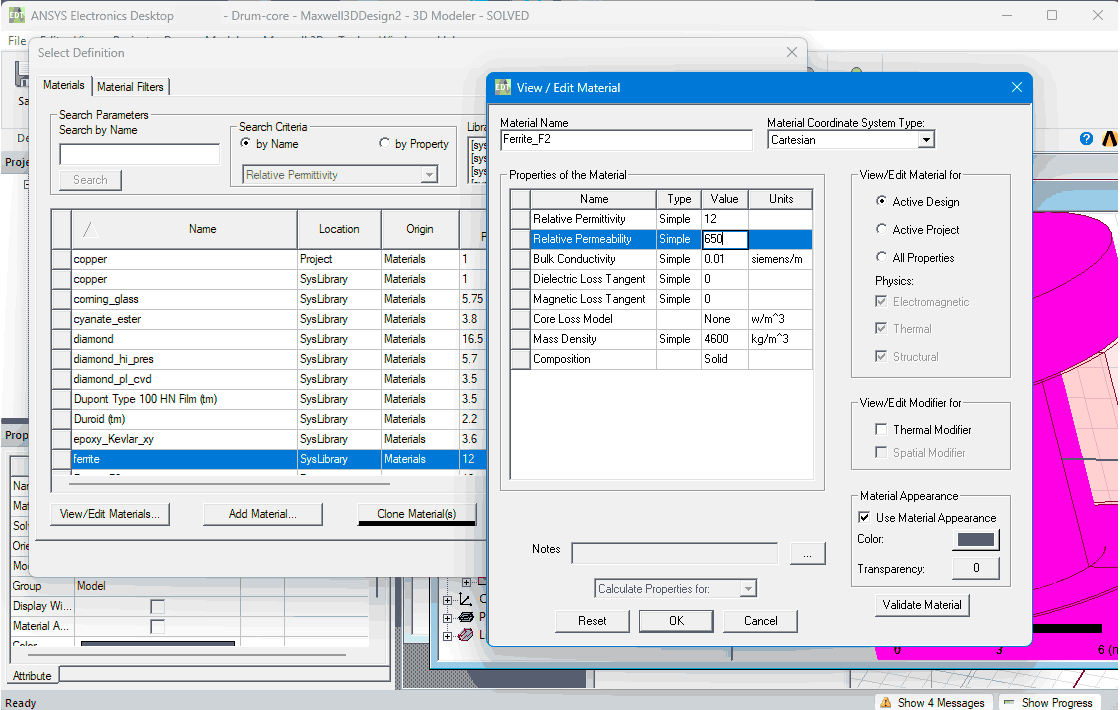 |
| Creating a 3D model of the core | Creating a clone of a material |
Since new objects have appeared in the model, it is necessary to confirm the presence of eddy currents in any of them. Calculating the inductance of the ferrite drum core coil yields the following result: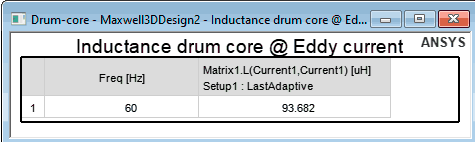
What advantages does MAXWELL 3D have over Coil64 when calculating multilayer coil?
- Calculation speed. If you don't need to spend time creating a 3D model and have a ready-made template, you can simply change the variable values. Since the calculation uses the “solid turn” method, with large number of turns it runs much faster than in Coil64.
- It is possible to create a model with any required winding shape and coil cross-section shape.
- It is possible to simulate the use of a core of any shape and material.
- It is possible to correctly calculate the coil losses at alternating current, including the eddy current losses in the core.
At the same time, the program, even in Eddy Current mode, assumes a quasi-static magnetic field model and cannot be used to calculate the coil's frequency properties, as we did with a single-layer coil in HFSS. Therefore, although MAXWELL 3D doesn't inform us of this, we must be aware of the existing frequency limitations for using such a choke.
You can download a zip archive containing two VBScripts. ANSYS ELECTRONICS DESKTOP allows you to load and run these scripts via the “Tools → Run Script” menu. By executing the scripts in this archive one after the other, you can automatically create, learn, and save the complete project from this article. The scripts are in text format and include comments. You can also open and read their contents in any text editor, such as Notepad.
Related links: